Starter
About
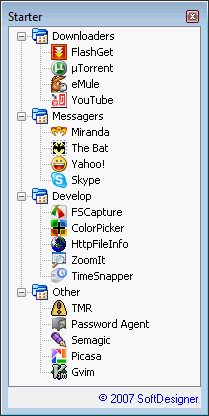
A small tool designed to help you starting of your favorite or high-usage applications by one click. All you need is clicking on Starter icon on Windows System Tray area and then click on necessary item in popped up window.
Benefits
Why Starter is better than Windows shortcuts on your desktop or Start Menu:
- list of all your favorite applications storing in single .ini file than can be easily backed up or quickly copied to another PC
- list of your high-usage applications can be splitted to different categories. I.e. "Internet", "Relax", "Job", etc.
- you don't need to create shortcuts anymore - just put one single line to configuration .ini file using your text editor
- you can easily restore list of your frequently used applications after reinstalling of Windows by copying one configuration file
- after reinstall of Windows you can see which of your favorite application still not installed - icon for this application in Starter list will be "broken"
- it's completely free ;-)
Screenshot
Download - Malware Free!
Installation package:
If you'll use Installer it can help you to make Starter run with Windows every time. Very comfortable.
Version: 1.1
License: Freeware
Compability: Windows 9x/2000/XP/Vista/7
Change Log
Usage
After installing of Starter utility use must change configuration file. Just add your frequently used applications with full paths to this file and that's it. Structure of configuration file shown below. Remember: don't change default name of configuration file. It always must be "Starter.ini". Also configuration file must be located in same directory with Starter application.
On Windows startup you may want to run Starter minimized. It's very simple - use parameter "/minimized" after application file name. I.e. "Starter.exe /minimized"
Configuration file
[Categories]
0=Downloaders
1=Messagers
2=Other

[Items]
0;FlashGet;C:\Program Files\FlashGet\flashget.exe
0;µTorrent;C:\Program Files\uTorrent\utorrent.exe
0;eMule;C:\Program Files\eMule0.47c\emule.exe
1;Miranda;C:\Program Files\Miranda\miranda32.exe
1;Yahoo!;C:\Program Files\Yahoo!\Messenger\YahooMessenger.exe
1;Skype;C:\Program Files\Skype\Phone\Skype.exe
2;FSCapture;C:\Program Files\FSCapture53\FSCapture.exe
2;Password Agent;C:\Program Files\Password Agent\PwAgent.exe
2;Picasa;C:\Program Files\Picasa2\Picasa2.exe
2;Parameter test;C:\windows\system32\cmd.exe|/c "calc.exe"
Sample configuration file is present in the installation package.
Commenting is closed for this article.

Comments:
Andy []
16 February 2009, 16:40 #
I have installed starter on a few machines. It's a great program by the way. Everything works great but applications in the menu will start automatically when the starter is launched. It's a different app in the list with different computers.. Any idea why this is happening?
but []
30 November 2009, 00:50 #
good soft!
Hayawata []
27 January 2010, 11:27 #
Great program. Can you pass parameters to the programs? If I add parameters I keep getting an error that windows can't find the EXE file. Thanks!!
Author [softdesigner.com]
9 January 2011, 00:11 #
Thanks guys for feedback. Just found some time and updated the Starter. Now it's v1.1 :) See the changelog.
TiPSY []
1 February 2011, 14:40 #
same Configuration file from Starter 1.0 (use since 1 year)
ver. 1.0 --> work | ver. 1.1 --> stop work
Ludwik []
25 March 2011, 22:13 #
Very useful and efficient piece of software. Thank you! Is it possible to make Starter start with categories closed?